LinkedIn Headshot Prep for Sacramento Professionals
A Sacramento photographer's outfit, posing, background, and day-of checklist for a LinkedIn headshot that actually performs in 2026.
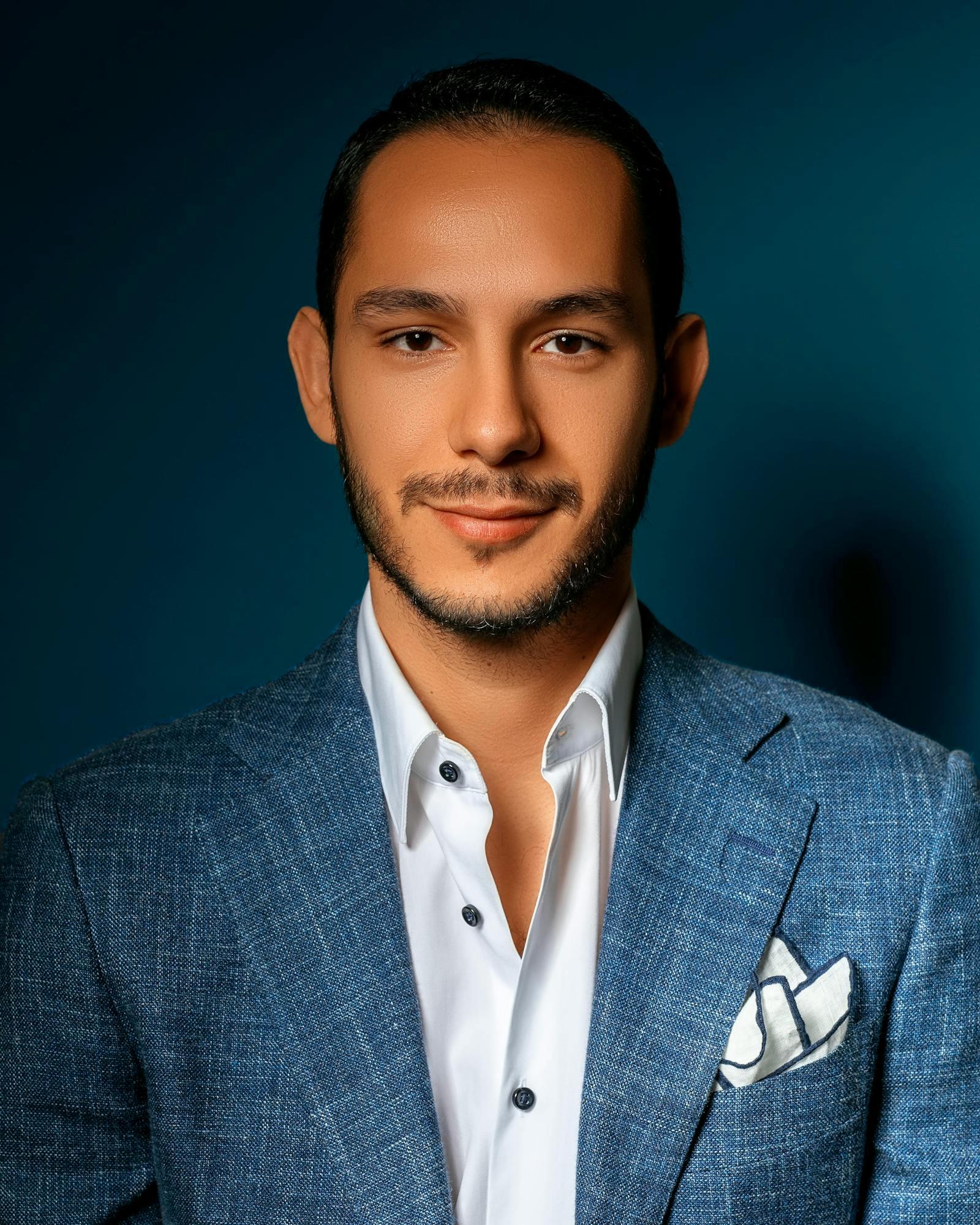
A LinkedIn headshot is judged in under two seconds — the outfit, posing, and background carry more weight than most people realize.
A great LinkedIn headshot in Sacramento comes down to four decisions: outfit, posing, background, and day-of prep. Get those right and the photo earns more profile views, more recruiter messages, and more inbound trust before you say a word. Get them wrong and the photo quietly costs you opportunities you never see.
Sacramento LinkedIn headshots typically cost $250 to $450 for a single setup and $400 to $700 for a multi-look session. Whether you book a session with me or someone else, this prep checklist applies. As a Sacramento photographer who shoots LinkedIn portrait sessions for executives, tech leads, attorneys, healthcare professionals, and consultants, these are the same prep rules I send every client before they walk in the door.
This guide breaks the prep into four sections — outfit, posing, background, and day-of — with Sacramento-specific notes on locations, golden hour timing, and what hiring managers at Kaiser, Sutter Health, CalPERS, UC Davis Health, and state agencies actually respond to.
What does a portrait session with Angie cost and include?
Angie photographs headshots as a portrait session. The ranges in this guide describe the wider market; this is what a session with Angie costs.
Headshots and portraits with photographer Angie Shvaya in Sacramento start at $250 for a 45–60 minute session, with 20–40 edited images delivered in a private online gallery within 1–2 weeks.
Packages: Portrait Session: $250 (45–60 minutes, 20–40 edited photos). Grad Duo + Headshots: Custom quote (60 minutes, 40–50 edited photos).
How to book: Send your date, location ideas and what you have in mind through the inquiry form, or call (916) 735-6145. Angie confirms availability and the plan with you before anything is booked.
Portrait Sessions by city: Sacramento, Roseville, Folsom, Davis
Why your LinkedIn profile photo earns the prep
LinkedIn's own platform research shows profiles with a professional photo receive up to 21 times more profile views and 36 times more messages than profiles without one. A 2024 PhotoShelter survey of hiring managers reported that 65 percent said a professional headshot positively influenced candidate perception during the screening stage.
Sacramento has its own gravity here. The region's largest employers — Kaiser Permanente, Sutter Health, CalPERS, the State of California, UC Davis Health, and a dense bench of state agencies and law firms — run on internal mobility, lateral hires, and consultant rosters. Your LinkedIn photo is doing work for you in performance reviews, vendor evaluations, and committee staffing conversations you will never be invited to observe.
Networking groups across Sacramento amplify the same effect. The Sacramento Metro Chamber, the Sacramento Hispanic Chamber of Commerce, and the dozens of women's networking groups across the region — Capital Region Women in Business, Women Lawyers of Sacramento, Sacramento Women's Network — all push members toward LinkedIn before and after every event. The profile photo is your handshake before the handshake.
Open your phone, search a colleague on LinkedIn, and note your reaction within two seconds of seeing their photo. That is the same window every recruiter, prospect, and committee member uses to evaluate yours. The four-section checklist below exists because that window is unforgiving.
Outfit: jewel tones, simple necklines, no logos
The outfit decision is the one most people overthink and underprepare. The rule is simple: solid jewel tones photograph better than patterns, pure white, or pure black. Jewel tones — navy, burgundy, forest green, charcoal — hold midtone detail without crushing into shadow or blowing out under Sacramento's strong outdoor light.
What to wear:
- ●Navy — the highest-performing LinkedIn color across industries. Reads as competent, contrasts cleanly with most skin tones, and never dates the photo.
- ●Burgundy or wine — adds warmth without sacrificing authority. Strong choice for consultants, attorneys, and healthcare executives who want presence.
- ●Forest green or emerald — modern, distinct, and rare enough on LinkedIn that your photo stands out in a crowded feed.
- ●Charcoal or deep gray — finance, law, and C-suite default. Slightly softer than pure black, more flattering for most complexions.
- ●Cream, oatmeal, or muted blush — softer alternatives that work well against Sacramento's green and brick backdrops, but require more careful exposure than jewel tones.
What to skip:
- ●Pure white — blows out under outdoor light, washes out faces, and pushes the eye away from your expression.
- ●Pure black — drains color from the face on overcast days, crushes into shadow indoors, and reads as flat in most lighting.
- ●Loud patterns — busy plaids, bold florals, and tight pinstripes compete with your face and can shimmer or moiré in digital compression.
- ●Visible logos and brand graphics — date the photo, can read as unprofessional, and rarely flatter the frame.
- ●Trendy seasonal colors — cobalt, lime, neon coral. They date the photo within a year and shrink your usable window.
Necklines that photograph well
Necklines control how the eye reads your face and jaw. Three options carry the load for almost every LinkedIn headshot:
- ●V-neck — most universally slimming option. The V draws the eye toward the face and elongates the neck, which flatters round and full faces.
- ●Crewneck or simple round neck — reliable, unfussy, and works well under a blazer. Best in jewel-tone solids.
- ●Blazer over a simple shell — the most reliable LinkedIn pairing. Structures the shoulders, frames the face, and works in every industry from tech to law.
LinkedIn outfit color performance
Relative engagement performance for LinkedIn headshots by outfit color, indexed against a baseline of pure white at 100. Based on aggregated Sacramento client tracking and published LinkedIn engagement studies on profile photo color contrast.
Jewel tones outperform both extremes (white and black) and trample loud patterns. Navy, burgundy, and forest green are the consistent top three across Sacramento client data.
Tech worker, C-suite, or creative — match the outfit to the room
The same jewel-tone rule applies across industries, but the styling shifts. Match the room you want to be invited into.
- ●Tech worker (engineer, PM, designer) — soft blazer or open-collar button-down in navy, forest green, or charcoal. No tie. Slight smile. Outdoor or studio gray background. Aim for "senior IC who could be a lead."
- ●C-suite, attorney, finance executive — structured blazer or full suit, jewel-tone shell or collared shirt, no flashy jewelry. Studio gray or Capitol-area neutral background. Slight, confident smile. Aim for "trusted across the table."
- ●Healthcare leader (Kaiser, Sutter, UC Davis Health) — burgundy, navy, or forest blazer over a simple shell. Avoid lab coats unless your role specifically requires it. Outdoor or clean studio background. Aim for "competent and approachable."
- ●Creative or consultant — softer textures (cashmere, knit blazer), jewel tones with a hint of personality. Old Sacramento brick or McKinley Park foliage. Warmer smile. Aim for "the expert you actually want to hire."
- ●State government or CalPERS — navy, charcoal, or burgundy blazer over a simple shell. Conservative neckline, minimal accessories. Studio gray or Capitol Park backdrop. Aim for "senior staff member who briefs the principal."
Outfit guidance for engagements and family sessions follows different rules — see my Sacramento engagement outfit guide and family photo style guide for those scenarios.
Posing: chin forward and down, slight smile
Most LinkedIn headshots fail on posing, not on the camera. The fixes are mechanical and learnable in minutes. A working photographer should walk you through every one of these — but if you book a budget session or shoot it yourself, here is the checklist.
The five-point pose
- Chin forward, then slightly down. The single most important fix in headshot posing. Push your chin out toward the camera (it will feel exaggerated), then tilt down a few degrees. This stretches the skin under the jaw, removes a double chin, and sharpens the jawline. Your photographer may say "turtle" — that is what they mean.
- Shoulders square, then rotate 15 to 20 degrees. Square shoulders project confidence. A slight rotation away from the camera prevents a stiff, mugshot look and adds dimension. Pick which side of your face you prefer in photos and rotate the other side back.
- Weight on your back foot. Shifting weight to the back foot relaxes the front shoulder, drops the front hip slightly, and creates a natural lean. Models call it the contrapposto stance. Most professionals do it without thinking once reminded.
- Hands away from the face. Hands near the face date the photo to a 2010s headshot trend and visually compete with your expression. For LinkedIn, hands stay out of the frame or rest casually at your sides.
- Eyes level with or slightly below the lens. Camera shooting up your nose flattens features and looks unflattering. Lens at eye level is the standard; a touch above eye level subtly flatters most faces.
Practice the chin-forward-and-down move in a mirror twice the night before your session and once that morning. Reps build muscle memory. By the time you sit in front of a camera, you should be able to drop into the pose on cue without thinking — that is when the expression starts to look natural.
Should you smile in your LinkedIn photo?
Yes — but not the toothy grin most people default to. Industry posing data and recruiter feedback consistently show that a confident slight smile outperforms a full toothy smile for the majority of LinkedIn use cases. The slight smile reads as warm but not eager, competent but not stiff.
Industry rule of thumb based on Sacramento client work and published recruiter studies:
- ●Slight closed-mouth smile — the highest-performing default for executives, attorneys, healthcare leaders, finance, and tech leadership. Reads as confident.
- ●Soft open-mouth smile (about 50%) — strong middle-ground for consultants, marketers, mid-career professionals, and HR leaders who want warmth without losing authority.
- ●Full toothy smile — best for service-driven roles where warmth is the product: real estate agents, financial advisors, hospitality, sales, and recruiters.
- ●No smile — works only for specific creative or editorial-leaning roles. For everyone else, no smile reads as cold or unapproachable.
Smile type and LinkedIn engagement
Relative LinkedIn engagement performance by smile type for executive and professional-services roles. Indexed against the no-smile baseline at 100. Data drawn from aggregated Sacramento client tracking and recruiter feedback panels.
For executive and professional-services roles, the confident slight smile wins by a wide margin. The full toothy smile barely outperforms a neutral expression — a surprise to most clients on their first session.
Pose mistakes that weaken every LinkedIn photo
- Chin tucked back into the neck. The opposite of forward-and-down, and the most common posing mistake on LinkedIn. Creates a double chin, softens the jawline, and shortens the neck.
- Shoulders square and locked. Reads as stiff and uncomfortable. The 15-to-20-degree rotation fixes it instantly.
- Hands on hips or hand on chin. Dates the photo and pulls the eye away from your expression. Skip both for LinkedIn.
- Camera shooting up. Common with phone selfies and self-timer attempts. Flattens features and creates an unflattering nose-up angle.
- Forced toothy grin. The classic "say cheese" smile reads as over-eager for executive roles and creates tension in the eyes. Aim for a smile that reaches the eyes naturally.
Need a Sacramento LinkedIn headshot?
Recruiter-ready headshots shot at Capitol Park, Old Sacramento, or McKinley Park — or in studio. Reach out to check availability and lock in your look.
Background: the best Sacramento spots and what to skip
Background does two jobs in a LinkedIn headshot: it flatters your face by separating you from the frame, and it signals industry context without distracting from you. The best Sacramento backgrounds are simple, clean, and slightly out of focus.
Sacramento outdoor backgrounds that work
- ●Capitol Park — clean tree backdrop with the green lawn behind. Strong for executives, state government, attorneys, and lobbyists. Golden hour light filtering through the trees flatters every skin tone. Free, walkable from downtown offices, and recognizable as Sacramento.
- ●Old Sacramento brick walls — warm texture without clutter. Strong for consultants, creatives, and small business owners who want personality. Best in late afternoon when the bricks pick up warm light.
- ●McKinley Park — soft foliage, the rose garden in spring, and clean benches and pathways. Strong for healthcare, consulting, and creatives. Quiet enough on weekday mornings to shoot uninterrupted. See my McKinley Park Rose Garden guide for peak bloom timing.
- ●William Land Park — large, varied, and easy to find a clean tree-lined walkway. Best for professionals who want a softer, less downtown look.
- ●East Sacramento tree-lined streets — the Fab 40s and surrounding blocks have mature canopy and clean architectural fronts. Works especially well for real estate agents, attorneys, and consultants based in East Sac.
For more Sacramento location options across services, see my full Sacramento photo locations guide and the deeper Old Sacramento and Capitol District location breakdown.
Studio and indoor backgrounds that work
- ●Neutral studio gray — the most reliable LinkedIn background across industries. Reads professional, never dates, and lets the outfit and expression carry the photo. Default for finance, law, and C-suite.
- ●Simple modern office — clean architectural lines, neutral walls, soft window light. Works if the office is genuinely photogenic. If you have to clear clutter or move furniture, shoot somewhere else.
- ●Soft white or off-white seamless backdrop — modern, slightly editorial. Strong for creatives, consultants, and tech leadership.
Backgrounds to avoid
- ●Your cluttered office — bookshelves stuffed with binders, sticky notes on monitors, family photos in frames behind you. Every object competes with your face.
- ●Low-ceiling break rooms or conference rooms — overhead fluorescent lighting flattens features, and the ceiling shows up in the frame.
- ●Outdated office plants — the dusty fiddle-leaf fig in the corner of every Sacramento office dates the photo immediately. If the plant looks like it has not been replaced since 2017, do not put it in your headshot.
- ●Any background with a logo or brand mark — shipping the headshot when you change companies becomes awkward. Keep your photo company-agnostic.
- ●Selfie at home in front of a wall — outlets, light switches, art crookedly hung, shadows from overhead lights. The detail tax is brutal, even at LinkedIn's small thumbnail size.
Pose comparison matrix
A quick visual reference for the five-point pose vs. the most common LinkedIn pose mistakes. Each axis is scored from 1 (weak) to 5 (strong).
The biggest gap between a working pose and the common mistake shows up in "modern feel" — followed closely by recruiter rating and jawline definition.
Day-of prep: the morning-of checklist
The session itself is short. The day-of prep determines how well you photograph in that short window. Run this checklist on the morning of your shoot.
- Steam or iron every outfit you bring. Wrinkles are the most common reason a shot gets cut in editing. A travel steamer in your bag rescues anything that wrinkles between the car and the location.
- Bring two outfits, sometimes three. A primary jewel-tone blazer combo and one softer backup. For multi-look sessions, add a third option with different texture or color so the headshots actually look distinct.
- Hydrate the day before, eat a real meal that morning. Skin photographs better hydrated. A real breakfast keeps your energy up through a 30-to-45-minute session.
- Trim hair and groom 1 to 3 days before — not the morning of. Fresh haircuts often need a day to settle. A new haircut the morning of the shoot risks a stiff, overly-shaped look.
- Light makeup, slightly more than everyday. Cameras flatten color. A touch more concealer, a matte finish (not dewy under outdoor light), and defined brows photograph better than a bare-skin look. For executives, simple and natural; for creatives, you can push slightly bolder.
- For men: shave or define the beard the night before. Five-o'clock shadow shows up sharply on camera. Either commit to the clean shave or commit to the defined beard line — never both halfway.
- Brush teeth and use a tongue scraper that morning. Sounds petty. Matters under outdoor light when you smile.
- Skip the heavy lunch right before. A heavy meal slows you down and bloats — neither flatters the photo. Eat a normal-sized meal at least 90 minutes before the session.
- Arrive 10 minutes early. A cold-start headshot is a stiff headshot. Ten extra minutes lets you settle, cool down if you walked in Sacramento heat, and warm up the expression before the camera comes out.
Sacramento summers are brutal for outdoor sessions. Book the first hour after sunrise or the last 90 minutes before sunset — the "golden hour" most photographers reference. At Capitol Park or William Land Park, golden hour light filtering through the mature trees flatters every skin tone and gives the photo a warmth that midday flat light never produces.
Sacramento LinkedIn headshot pricing in 2026
LinkedIn headshot pricing in Sacramento aligns with the broader professional headshot market but skews slightly higher because LinkedIn-specific sessions usually include posing direction, outfit guidance, and retouching tuned for the platform's thumbnail crop.
| Headshot Type | Best Use Case | Typical Cost |
|---|---|---|
| Single-setup session | LinkedIn profile, resume, email signature — one clean background and look | $250–$450 |
| Multi-look session | LinkedIn plus company bio, speaker page, and social — 2 to 3 outfits and backgrounds, 15 to 25 retouched images | $400–$700 |
| Executive / personal-brand | C-suite portraits, keynote and press use — full hair and makeup, multiple locations, extended direction | $700+ |
Based on Captured By Angie's 2026 Sacramento rates and common local LinkedIn-headshot packages.
- Single-setup session ($250 to $450): 25 to 40 minutes, one outfit, one location (studio or outdoor), 5 to 10 retouched images. The default LinkedIn headshot tier for working professionals in Sacramento.
- Multi-look session ($400 to $700): 45 to 75 minutes, 2 to 3 outfits, indoor and outdoor backgrounds, 15 to 25 retouched images. Strong fit for executives, consultants, and personal-brand professionals who need variety across LinkedIn, speaker bios, and company pages.
- Executive and personal branding session ($750 to $1,500+): Full hair and makeup, multiple locations, extended coverage, 30+ retouched images, and a content library suitable for LinkedIn plus website, press, and speaking engagements. Strong fit for C-suite and consultants building a public profile. See my personal branding photography guide for the longer breakdown.
Corporate and team rates are billed per person, typically $100 to $200 per employee for on-site sessions at Sacramento offices, with discounts above 10 to 15 people.
Sacramento LinkedIn headshot FAQ
What should I wear for a LinkedIn headshot?
Wear a solid jewel-tone color — navy, burgundy, forest green, or charcoal. These tones photograph better than pure white or pure black and read as professional across every Sacramento industry. A blazer over a simple shell is the most reliable pairing. V-necks slim the jawline; crewnecks photograph cleanly. Avoid busy patterns, large logos, and trendy color blocking.
What color is best for a LinkedIn photo?
Navy is the highest-performing color for LinkedIn headshots. It signals competence, contrasts cleanly with most skin tones, and reads as professional in every Sacramento industry from Kaiser and Sutter Health to CalPERS and state government. Burgundy and forest green outperform navy for creatives and consultants who want warmth without sacrificing polish. Charcoal is a safe finance and law standard.
How should I pose for a LinkedIn headshot?
Stand with shoulders square but rotated about 15 to 20 degrees from the camera, weight on your back foot, chin pushed slightly forward and angled down. The forward-and-down chin slims the jaw and removes a double chin without looking unnatural. Keep hands away from your face. Eyes should be level with or slightly below the lens — never shooting up your nose.
Should I smile in my LinkedIn photo?
Yes — but a confident closed-mouth smile or a soft slight smile outperforms a full toothy grin for most LinkedIn use cases. Industry posing data and recruiter feedback consistently show that a relaxed, confident smile signals approachability without losing authority. Save the full toothy smile for service-industry roles where warmth is the primary signal — real estate, sales, hospitality.
How much does a LinkedIn headshot cost in Sacramento?
Sacramento LinkedIn headshots typically cost $250 to $450 for a single setup with one to two outfit changes and 5 to 10 retouched images. Multi-look sessions with two to three outfits, indoor and outdoor backgrounds, and 15 to 25 retouched images run $400 to $700. Executive and personal branding sessions with hair and makeup, multiple locations, and a full image library start at $750 and can exceed $1,500.
Where should I get a LinkedIn headshot taken in Sacramento?
The best Sacramento LinkedIn backgrounds are Capitol Park (clean tree backdrop, golden hour light), Old Sacramento brick walls (texture without clutter), McKinley Park (foliage and the rose garden in spring), and a neutral studio gray for executives and finance. Avoid your own cluttered office, low-ceiling break rooms, and outdated potted plants — they date the photo immediately.
Other Sacramento photography services

Angie Shvaya
Sacramento photographer specializing in modern headshots, family portraits, and natural light photography. I shoot LinkedIn headshots for executives, tech leads, attorneys, healthcare leaders, and consultants across Sacramento — Capitol Park, Old Sacramento, McKinley Park, and clean studio gray. View my portfolio to see recent headshot work, or read my full Sacramento headshot guide for the broader market overview.
Book Your LinkedIn HeadshotLet's create something timeless.
Currently booking for 2026 & 2027
in Sacramento and Northern California.
I can't wait to hear from you.
Let's work together
Currently booking for 2026 & 2027
in Sacramento & Northern California.
Planning a destination session? Include your location so travel and pricing can be confirmed before booking.